#238 Navigating Months
February 27, 2026 • 12 Notes • Curated by FelixUpdate on what happened across the GNOME project in the week from February 20 to February 27.
GNOME Core Apps and Libraries
Calendar ↗
A simple calendar application.
Hari Rana | TheEvilSkeleton (any/all) 🇮🇳 🏳️⚧️ announces
Georges livestreamed himself reviewing and merging parts of merge request !598, making the month view easier than ever to navigate with a keyboard!
This merge request introduces a coordinate-aware navigation system in the month view, which computes the coordinates of relevant event widgets and finds the nearest widget relative to the one in focus when using arrow keys. When tabbing, focus moves chronologically, meaning focus moves down until there are no event widgets overlaying that specific cell, which then moves focus to the topmost event widget found in the next cells or rows; tabbing backwards goes in the opposite direction.
To illustrate the sheer complexity of navigation in a calendaring app, here is Georges’s live reaction:
“Wow, congratulations, this is looking INSANE, Hari… The hell is going on here”
— Georges, maintainer of GNOME Calendar - https://youtu.be/smofXzVwNwQ?t=1h24m6s
Blueprint ↗
A markup language for app developers to create GTK user interfaces.
James Westman says
Blueprint 0.20.0 is here! This update includes a ton of features from many contributors. Most significantly, this release includes a linter thanks to Neighborhoodie and the STA grant. The linter catches common mistakes that go beyond simple syntax and type checking. Due to the nature of these checks, it may still have some rough edges, so please file an issue if you see room for improvement.
Also of note are a number of new completion suggestions while editing, improved type checking in expressions, and support for newer GTK features like Gtk.TryExpression.
GNOME Circle Apps and Libraries
Tobias Bernard says
Sudoku by Sepehr Rasouli was accepted into Circle! It’s what it says on the tin: A dead-simple, polished GNOME app for playing Sudoku. Congratulations 🥳

Tobias Bernard reports
Gradia by Alexander Vanhee was accepted into Circle ✨️
Edit and annotate screenshots, draw on them, add a background, and share them with the world.

Third Party Projects
Anton Isaiev says
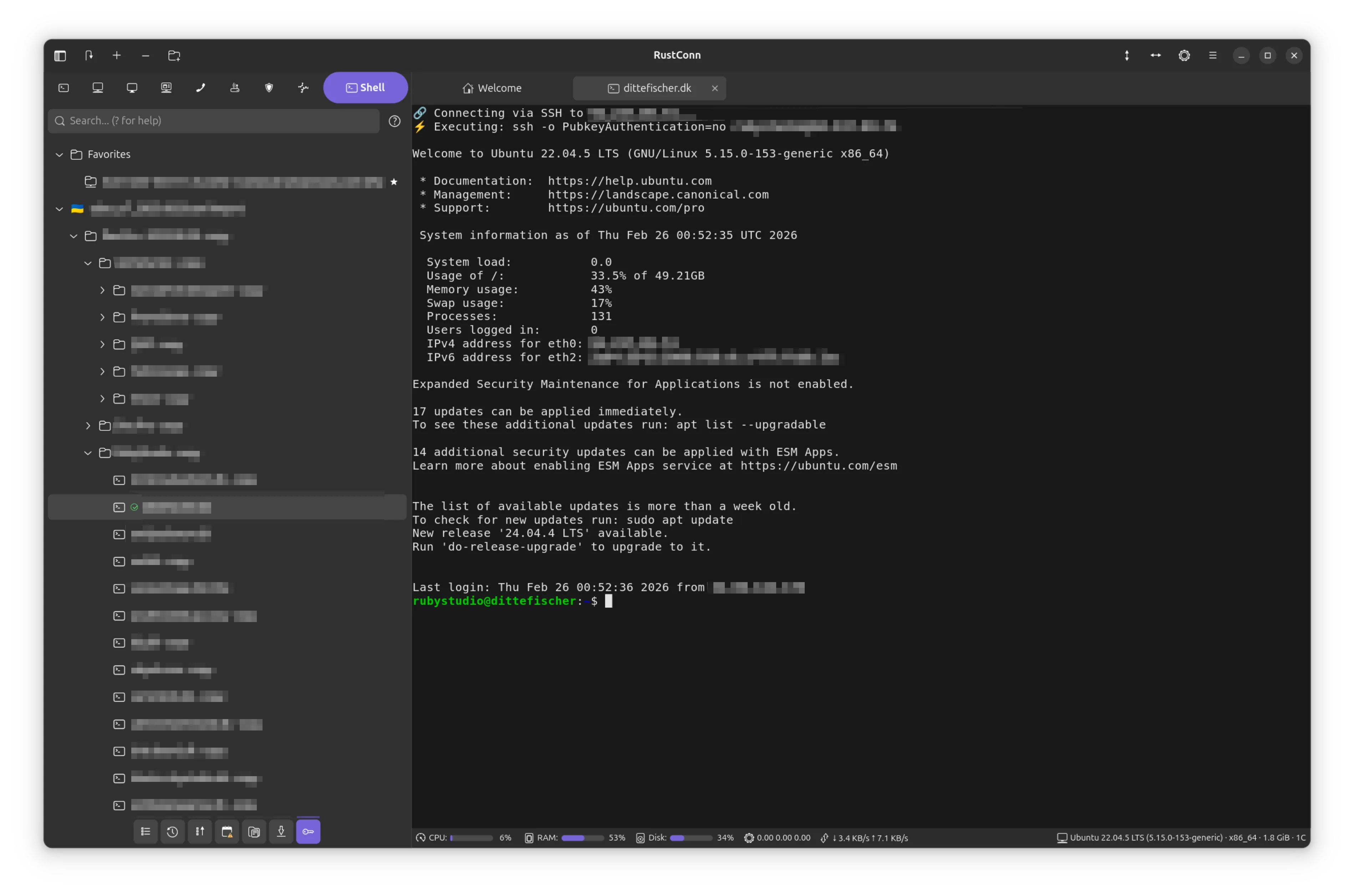
RustConn 0.9.3 is out!
This release cycle was all about closing the gap between “it works” and “it works exactly how you’d expect.” I successfully closed every single open issue and feature request from this period, delivering major quality-of-life and security upgrades for anyone who lives in a terminal.
Highlights from this release:
Agentless Remote Monitoring: A MobaXterm-style bar now sits below your SSH, Telnet, and Kubernetes terminals, parsing /proc/* over the existing session to show live CPU, memory, disk, and network stats.
Lightning-Fast Navigation: A new Command Palette (Ctrl+P) brings VS Code-style fuzzy searching for connections, tags, and commands. I also added full support for Custom Keybindings, letting you remap 30+ actions.
Visual Organization: Tame massive connection lists with pinned Favorites, custom GTK icons or emojis, and protocol-colored tabs with group indicators (e.g., “Production” or “Staging”).
Modernized UI: Eight dialogs were migrated to modern adw::Dialog with adaptive sizing, and I’ve added screen reader support to password and connection dialogs.
Rock-Solid Security: A massive backend overhaul! Stored credentials now use AES-256-GCM with Argon2id, and the entire codebase was migrated to SecretString to prevent memory leaks. I also added full support for SSH port forwarding (-L, -R, -D).
pass Backend: A huge shoutout to community member @h3nnes for contributing a pass (passwordstore.org) backend with full GUI and CLI support!
Under the Hood: Migrated to the Rust 2024 edition, added smart protocol fallbacks for RDP/VNC to gracefully handle negotiation failures, and reached 100% translation coverage across 15 languages.
https://github.com/totoshko88/RustConn https://flathub.org/en/apps/io.github.totoshko88.RustConn
Haydn Trowell says
Typesetter, the minimalist, local-first Typst editor, gets some quality of life updates with version 0.11.0:
- New app icon
- The preview now automatically sizes itself to fit the window and your display without needing a manual PPI setting
- Invert lightness option for the preview when using dark mode
- The ability to simulate different forms of color blindness in the preview to test document accessibility
- Performance improvements, including reduced memory usage
Install via Flathub (https://flathub.org/apps/net.trowell.typesetter)

Bilal Elmoussaoui announces
oo7-daemon, the server side of the Secret Service provider, has received a new release featuring KDE support. Making it compatible with both GNOME and KDE.
GNOME Websites
federico announces
The Code of Conduct page is now generated from the original sources with a beautiful stylesheet. Thanks for Bart for the web app and the design team for the updated look!
Shell Extensions
storageb reports
Build your own custom menu for the GNOME top bar!
Custom Command Menu is a GNOME extension that lets you build a custom menu to run commands directly from the top bar. Launch apps, run scripts, execute shell commands, and more through a simple, intuitive interface.
Version 13 introduces support for submenu creation, increases the maximum number of entries allowed, and adds compatibility with GNOME 50. This release also includes additional translations for Japanese, Chinese, Portuguese, and Polish.
More information can be found on the project’s GitHub page.

Miscellaneous
Sophie (she/her) reports
As a cost-saving measure, git traffic like
git clone https://gitlab.gnome.org/GNOME/<repo>is now redirected to our mirror underhttps://github.com/GNOME/<repo>.
Peter Eisenmann says
Last week the long unmaintained support for Google Drive in gvfs was dropped. If you ever needed motivation to switch to a more privacy-respecting cloud provider, now is as good a time as any.
That’s all for this week!
See you next week, and be sure to stop by #thisweek:gnome.org with updates on your own projects!