#266 Fifty One!
September 18, 2026 • 12 Notes • Curated by FelixUpdate on what happened across the GNOME project in the week from September 11 to September 18.
This week we released GNOME 51!

This new major release of GNOME is full of exciting changes, including visual signatures in Papers, Maps offline usage, Files refinements, Calendar usability improvements, many accessibility enhancements, and much more! See the GNOME 51 release notes and developer notes for more information.
Readers who have been following this site will already be aware of some of the new features. If you’d like to follow the development of GNOME 52 (Spring 2027), keep an eye on this page - we’ll be posting exciting news every week!
GNOME Core Apps and Libraries
Libadwaita ↗
Building blocks for modern GNOME apps using GTK4.
Alice (she/her) 🏳️⚧️🏳️🌈 reports
A few days late, but I published an overview of the new features in libadwaita 1.10.
Internships
Felipe Borges says
We just concluded another successful season of Google Summer of Code with GNOME! In case you missed it, here’s where you can find all the details about the projects and work done by our interns https://feborg.es/wrapping-up-gsoc-2026-with-gnome
GNOME OS ↗
The GNOME operating system, development and testing platform
Ada Magicat announces
We now have documentation, on a website!
We wrote new guides, updated old ones and consolidated most information about GNOME OS and gnome-build-meta in one place. We now automatically publish a small book with up-to-date documentation on installing and using GNOME OS as well as how to contribute to GNOME OS and the GNOME flatpak runtimes
This is the result of many items of work over the last few months.
And we’re not done yet! We have a few more items that need validating and updating.
Ada Magicat reports
Users with little RAM, rejoice! GNOME OS should now stay fast and responsive even if you’re using a lot of RAM.
This is because we now use zswap, a Linux kernel feature that intelligently compresses infrequently used memory contents and writes them to a swap file.
For the few users that had issues with applications being killed due to their system running out of memory, this change should help a lot.
Thanks to Jonas, Sebastian and Valentin for working on this. You can try it out on the latest GNOME OS nightly.
Miscellaneous
albfan reports
Hi, some gitg contributor write this https://medium.com/@divyanshurajput709/one-micro-commit-at-a-time-my-gnome-journey-and-oosc-4-0-9b36236c4066
Third Party Projects
Deimos Hall says
Metamorphosis is an app to edit metadata. This week it received a new app icon by Hylke Bons and an update that improves the user experience with four categories to let users discover what to edit in an easier way. But it’s an ongoing work. If you find the tool useful, I need you. Please help me to drive the decisions for the future of the app, I want it be able to edit metadata of any kind of popular file formats as well as general date & time system metadata.
My goal is a tool that covers:
- Geotagging and Metadata Editor
- An app to change the modification date / timestamps of one or more files on the filesystem
- JExifToolGUI replacement
- Is coded by hand (no AI)
Download it on Flathub.

Daniel Elia announces
Convey, a GTK4 email client, has finally launched on Flathub!
It’s a fork of Geary with Microsoft 365 support, GTK4, as well as a bunch of bugfixes and UX improvements, notably fixing scroll issues on the conversation list, more predictable keyboard navigation and improved legibility in dark mode.
We’re now on version 50.1, with 50.2 on the horizon. Graph accounts now persist their folders so they load offline, folder keyboard navigation is predictable, Escape deselects conversations (with autoselect off in Trash and Junk), and dark mode rendering and context menu positioning in the message body are fixed.
Install it from Flathub, and check out the GitLab repo!

Alain announces
Planify 4.20.0 — Nextcloud Deck, CalDAV reminders, productivity goals, and more
Planify, a task manager with Todoist, Nextcloud and CalDAV support, released 4.20.0 — one of its biggest updates yet. Highlights:
- Nextcloud Deck integration — boards, stacks and cards sync two-way, with labels, drag and drop across boards, and archiving.
- CalDAV reminder sync — reminders now sync bidirectionally with Nextcloud, Radicale, Tasks.org and Thunderbird via standard
VALARM.- Productivity goals — set daily and weekly targets, track them with a mini progress widget, and review an 8-week activity heatmap.
- GNOME Online Accounts detection — existing Nextcloud/CalDAV accounts are detected and can be imported without retyping the server URL.
- Quality-of-life — completed tasks in Today, sort and filter across All Tasks, keyboard project navigation, locale-aware dates, better PDF export, and automatic backup retention.
Read the full release notes here.
Tanay Bhomia announces
Whisp v1.5.0 - Custom keyboard Shortcuts and Gnome Search Integration
This Week I released Whisp 1.5.0 Which includes two main things
- Integration with the gnome search - Now you can search through your entire notes without even opening the app by using the native gnome search
- Custom Keyboard Shortcuts - This is one of the most requested feature on the repo and I wanted to develop it for a long time so finally it is here.
- Adding a Keyboard Shortcut for exporting notes - This shouldve been added in the last release but somehow I missed it
Links:
Flathub: https://flathub.org/apps/io.github.tanaybhomia.Whisp
GitHub Repository: https://github.com/tanaybhomia/Whisp
Project Website: https://tanaybhomia.github.io/Whisp
Support & Donation: https://tanaybhomia.github.io/Whisp/donate.html
Personal Website: https://tanaybhomia.github.io
Now that we have this app thing out of the way. I wanted to share something ( I wanted this to be a good news and share with you guys that I landed a job but) I sat for an interview for KPMG which I went till the last round of but then got rejected for. I lost motivation for anything actually I really wanted to land this job. But eh. I hope I get a job real soon.
Thank you for your support
Anton Isaiev reports
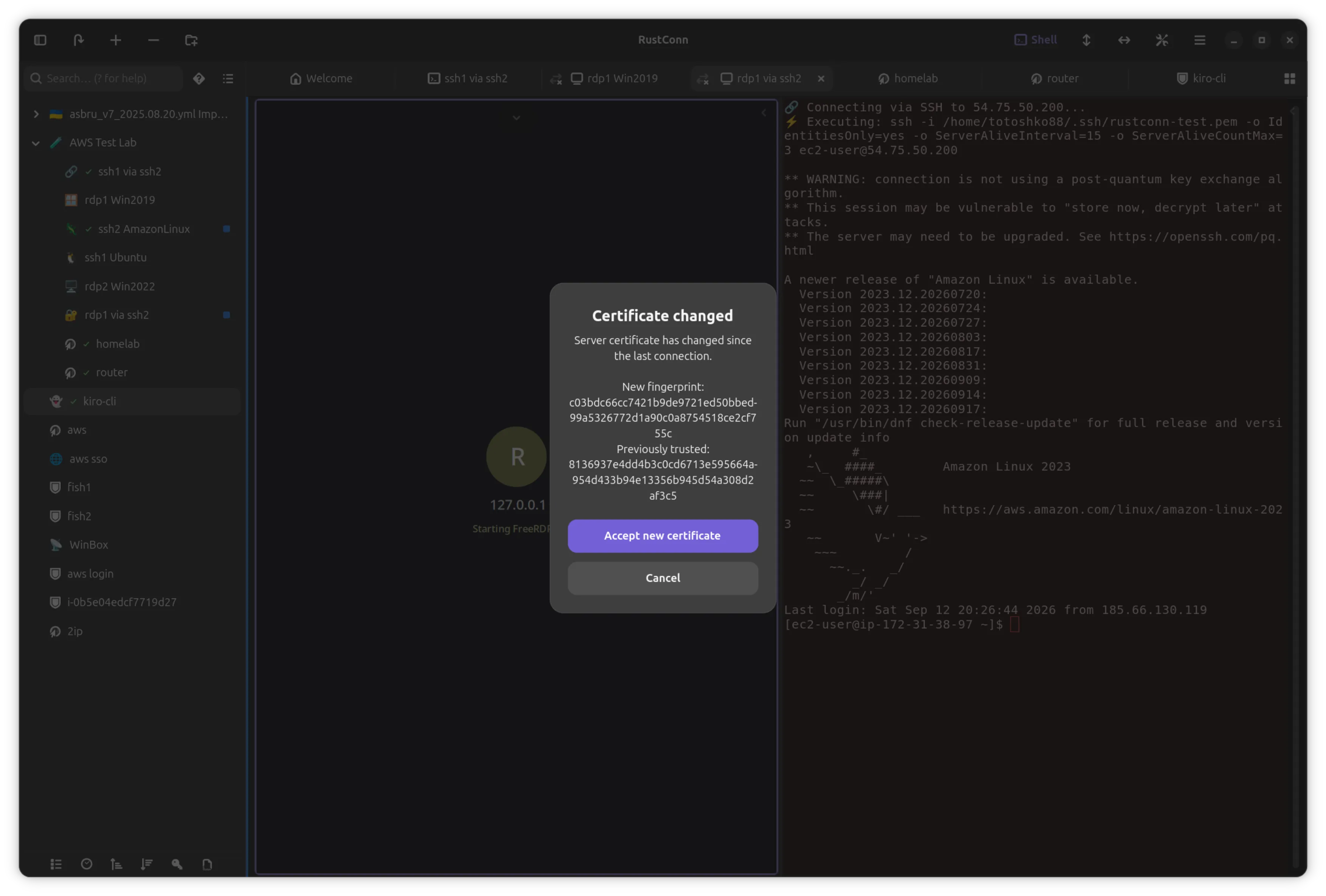
RustConn 0.22.0 is out - connection manager for SSH, RDP, VNC, SPICE, Telnet, Serial, Kubernetes, Web and Zero Trust (GTK4/libadwaita).
New features: import your existing setup from mRemoteNG, PuTTY and KiTTY, and export RDP connections to standard .rdp files. A one-click private browser tunnelled through any SSH host (embedded or an external Chromium), and a Web connection that can browse through a bastion the same way. Interactive ASK variables that prompt for a value at connect time, plus built-in date, time and environment placeholders in any ${…} field. Terminal colours can now follow the desktop light/dark setting and repaint live when it flips. A monitoring mode that fires on a real shell event - the command finished, with its exit code - and marks the tab until you look at it. Automatic answers to sudo, su and doas prompts on SSH sessions; an output filter that pipes a session through ChromaTerm, ccze or pv before it is shown; FIDO2 passkey redirection for RDP; a searchable connection list in the cluster editor; and an editable login timeout.
Security: SSH passwords are now handed to OpenSSH itself instead of being typed into the terminal, which closes a whole family of “wrong prompt gets the password” bugs; session recordings and logs were storing secrets and were world-readable, both fixed; a debug log could contain an RDP account password in clear; an RDP server could write files outside the folder you picked or make the client allocate gigabytes; and dangerous VNC viewer arguments could be smuggled in from an imported connection. Every secret-backend subprocess now has a deadline, and a password the selected backend refused is no longer redirected somewhere the connect path never reads.
Fixes: a jump host set on a group or globally was stored and shown as inherited, then dropped at connect for SSH, RDP, VNC and SPICE; SPICE and RDP asked for the password every time instead of using the stored one, and failed on Flatpak and macOS; embedded RDP now verifies the server certificate on first use like SSH does for host keys; the embedded web browser lost its login on every restart; RDP clipboard file transfer never actually worked; Bitwarden auto-unlock did nothing in any language but English; a KeePass group password was saved but never loaded back; embedded RDP could be killed by a Windows 11 keepalive; and a pile of macOS paths that assumed Linux now find the real .app clients and runtime directories.
Thanks to everyone who uses RustConn, reports bugs, contributes or supports the project. If you’d like to support development - the repo has a Sponsor link.
https://github.com/totoshko88/RustConn https://flathub.org/apps/io.github.totoshko88.RustConn https://snapcraft.io/rustconn/


Gir.Core ↗
Gir.Core is a project which aims to provide C# bindings for different GObject based libraries.
Marcel Tiede announces
GirCore 0.9.0-preview.1 got released. It features a new API to match GExceptions with errors and supports nullable return values from instance factories.
Shell Extensions
Romain says
Night Theme Switcher, the GNOME Shell extension that automatically toggles the desktop to dark mode at night, has been updated for GNOME 51.
It includes a redesigned preferences window that visually previews the day and night appearances and makes setting multiple commands easier, and adds the long requested features of accent color switching and manual location setting.
You can install it from the Extensions website, and the [source code is available on GitLab](https://gitlab.com/rmnvgr/nightthemeswitcher-gnome-shell-extension.

That’s all for this week!
See you next week, and be sure to stop by #thisweek:gnome.org with updates on your own projects!